





ChatNet v2.1 PHP Chat Room & Private Chat Script Free Download | Full Setup & Features Guide
ChatNet v2.1 is a free PHP chat room and private chat script for websites. Learn how to install, customize, and use ChatNet to build real-time communication and community chat systems easily.
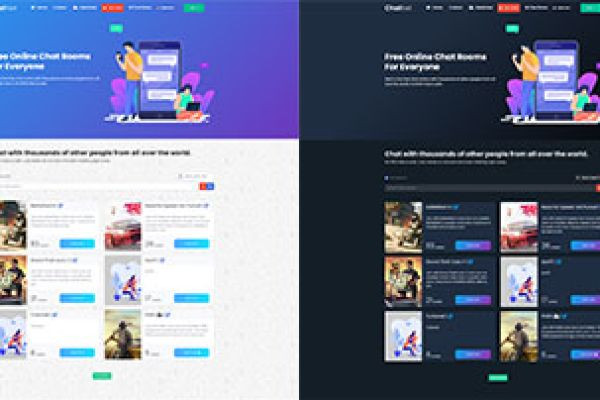
ChatNet v2.1 PHP Chat Room & Private Chat Script (Free Version) – Full Review & Setup Guide
ChatNet v2.1 is a modern PHP-based chat room and private chat script that allows users to communicate with each other in real-time directly through a website. It’s a web application that brings together public chat rooms, private messaging, and user management features in one simple package.

Unlike complicated software that requires heavy configuration, ChatNet is designed to be lightweight, responsive, and easy to install on any PHP-supported hosting server. It helps website owners build an interactive community, customer support system, or social platform without paying for expensive SaaS chat tools.
"The download link is included inside one of the three buttons."
Why ChatNet v2.1 is Popular Among Developers
There are many PHP chat scripts online, but ChatNet v2.1 stands out for its simplicity and flexibility. It’s built with clean PHP and JavaScript code, meaning developers can easily customize the design or add new features.
This version includes essential improvements such as private chat options, modern UI updates, better user notifications, and improved message delivery speed. Whether you run a small community forum, a social site, or a support system, ChatNet v2.1 can help you connect people instantly.
Main Features of ChatNet v2.1
- Real-time Chat System: Users can chat instantly without refreshing the page.
- Group Chat Rooms: Create multiple chat rooms for different topics or interests.
- Private Messaging: Secure one-to-one chat feature for personal conversations.
- Online User List: Displays all active users in real-time.
- Simple Admin Panel: Admins can manage rooms, messages, and user bans.
- Mobile Responsive Design: Works perfectly on phones, tablets, and desktops.
- Emojis & File Sharing: Supports fun emoji messages and small file transfers.
- Easy Installation: Can be set up on any PHP hosting with a MySQL database.
- Lightweight Performance: Runs smoothly without high server usage.
- Open Source Freedom: Developers can edit and customize freely.
How to Install ChatNet v2.1 PHP Chat Script
Script Download Google Drive
Setting up ChatNet is simple and doesn’t require deep technical skills. Here’s a step-by-step guide to help you install it safely:
- Download the Script: Get the latest ChatNet v2.1 package from a trusted PHP script sharing site.
- Upload to Your Hosting: Use your hosting control panel or FTP to upload the extracted files to your public_html or main directory.
- Create a Database: Go to your hosting control panel (like cPanel) and create a new MySQL database and user.
- Edit the Config File: In the script folder, open
config.phpand enter your database name, username, and password. - Run the Installer: Visit your domain (e.g., yoursite.com/install.php) to start the setup process automatically.
- Complete the Setup: Follow on-screen instructions and log in to your admin panel to configure settings.
After setup, you can easily create chat rooms, moderate users, and even embed the chat box into other pages of your website.
Advantages of Using ChatNet on Your Website
"The download link is included inside one of the three buttons."
ChatNet v2.1 can add a real-time communication system to your site, improving user engagement and retention. Here are some key benefits:
- Boosts Community Engagement: Visitors can connect instantly, making your site more interactive.
- Improves Support Experience: Use private chat for live customer support.
- Increases Website Activity: Active chat rooms keep users online longer, improving SEO engagement metrics.
- Low Resource Usage: Runs on shared hosting with minimal CPU load.
- No Monthly Fees: Unlike third-party chat tools, ChatNet is free and self-hosted.
Security & Privacy Features
ChatNet v2.1 includes essential security layers like message sanitization, IP tracking, and spam control. Admins can ban users, mute accounts, and delete inappropriate content.
Private messages are stored safely in your database, and access permissions prevent unauthorized viewing. These features make it suitable for both personal and business use.

Customization and Integration
Developers love ChatNet because it’s easy to customize. You can edit HTML, CSS, and PHP files to match your website’s branding. Many users integrate ChatNet with CMS platforms like WordPress or with existing login systems.
You can also add APIs, modify design themes, and adjust chat room layouts. If you’re familiar with basic web development, you can make ChatNet look like a premium live chat system without any license fee.
Performance & Mobile Compatibility
The script uses AJAX and jQuery for real-time messaging. This ensures messages appear instantly, just like social media chats.
ChatNet v2.1 works perfectly on smartphones and tablets, meaning users can chat on the go. It adjusts to screen sizes automatically, maintaining a smooth and modern layout on all devices.
Free vs Premium Versions
The free version of ChatNet includes all the essential functions for general use. However, some developers offer premium modifications with advanced features such as voice chat, video chat, or extended admin tools.
If you’re building a small or medium community, the free version is more than enough. It’s secure, stable, and easy to maintain.
AdSense Safety and Legal Use
Many people ask if ChatNet-based sites can get AdSense approval. The answer is yes — if you use it properly. Google AdSense allows chat systems as long as the website follows content and privacy rules.
To make your ChatNet site AdSense-friendly:
- Do not allow adult or offensive messages.
- Add a privacy policy and terms page.
- Use HTTPS for secure connections.
- Keep chat moderation active to remove harmful content.
- Ensure the chat page has original text content and proper navigation.
When managed responsibly, a ChatNet chat room site can generate stable traffic and AdSense income through contextual ads and active user engagement.
Conclusion
ChatNet v2.1 PHP Chat Room and Private Chat Script is one of the simplest ways to bring real-time communication to your website. It’s free, responsive, lightweight, and customizable. With minimal setup, you can launch a fully functional chat community or private messaging system that works across all devices.
Whether you’re a beginner web developer, a community admin, or a small business owner, ChatNet gives you full control over your chat system without recurring costs. It’s a perfect example of open-source innovation helping people connect online.
Disclaimer: This article is written for educational and informational purposes only. Always download scripts from trusted sources and follow your web host’s security guidelines.
© 2025 Tech Insight Blog. All Rights Reserved.








1 Comments